|
Manual Installation
|
|
|
These steps can be followed to
install the program without using the NetShield Wizard included with the
program.
After you install the program using the
Windows Installer that comes already included in the package, you do not
have to use the NetShield Wizard to install it on the target server.
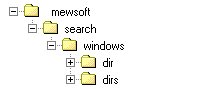
For example, if you install the program on
your computer under the directory \mewsoft\search,
the default installation directory, then the installation directory should
look like figure (1) after installation.
|
|
|
 |
|
|
Figure (1) Directory
Structure
|
|
|
Note that the directory windows
means this version of the program for Windows Servers only. For Lunix,
this directory will be linux, for FreeBSD version, this directory is
freebsd, for Solaris servers, this directory is solaris, etc.
Please note the executables programs are
platform dependent, which means you have to use the correct program
version for each server operating system.
|
|
|
Copy or transfer the directory
"dir" and all its sub directories and files to your
server executables directory, normally this is your cgi-bin directory.
|
|
|
Copy or transfer the directory
"dirs" and all its sub directories and files to your
server documents or html directory, normally this is your www or
httpdocs directory.
|
|
|
Now just follows the post
installation instructions to set the directories and files permissions,
configure your SQL database, create SQL tables, etc.
|
|
|
|
|
|