|
|
|
|
|
|
|
|
|
|
|
|
|
Make Money $$$$ Share Mewsoft and make 50% of any sales and become a reseller. All you need to become a reseller is to buy the first copy at the regular price. Details
|
|
|
|
|
|
|
Classifieds Software
Run Your Own Classifieds Site
Mobile Ready, Supports All Devices, Mobiles, Tables, Laptops, Desktops, and TV's.
|
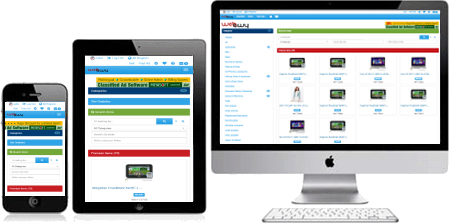
Click device image to see the live demo
|
Our Webawy Auction Software is a complete Auction software, comes with Classifieds software, Forums software, Stores and Mall software, Wanted Ads software, Blog software, Content Management CMS software, Banner System software, Affiliates software, Private Mail software,
Multi-lingual, Multi-theme, Responsive design, supports all devices with 17 built in themes, and Much More Open Source Code for all operating systems.
|
|
|
|
Webawy Some Main Features Summary
These documentations not always updated, please check our demos for full
features.
For latest features and updates see our
Announcements Forums and the live demos.
-
SQL database driven 100%.
-
Turbo FastCGI Feature.
-
Android Client Application For Users.
-
Customers to customers auctions.
-
Business to business auctions.
-
Business to customers auctions.
-
Mange each user buy/sell rights.
-
Full Auction system module.
-
Classifieds Ads module.
-
Stores for users module.
-
Want Ads module.
-
Blog/CMS/Article module.
-
Forums module.
-
Unlimited nested categories.
-
Multi - lingual.
-
LiveUpdate.
-
Widgets based with API.
-
Gadgets based API.
-
Embedded Perl Code.
-
Proxy bidding system.
-
Dutch auctions support.
-
Fixed price items.
-
Reserve auctions support.
-
Private auctions support.
-
Full user accounts manager.
-
Advanced search tools.
-
Scheduled auctions.
-
Fully automated.
-
Featured category auctions.
-
Featured home page auctions.
-
Featured category classified ads.
-
Featured home page classified ads.
-
Images and multimedia files uploads.
-
Images gallery and video players.
-
Powerful users feedback forum.
-
Announcements system.
-
Auctions Manager.
-
Polls System.
-
Fees Manager.
|
|
-
Full Accounting System.
-
Security Code Image.
-
Seller/Buyers Custom Invoices.
-
Seller/Buyers Purchase Messaging.
-
Your custom widgets and gadgets.
-
Auto Extend - Anti-Sniper
-
Q & A and Seller Comments
-
Fully integrated banner server.
-
User registration confirmation.
-
Database management.
-
New, Hot, and Going Auctions
-
Big ticket auctions.
-
HTML template based.
-
Visual html editor.
-
Custom functions.
-
External programs integration.
-
Unlimited mailing lists.
-
Easy setup wizard.
-
Intelligence upgrade system.
-
Very customizable.
-
Credit card processing.
-
Portal News, Stock, Currency, etc.
-
Paypal full automatic integration.
-
Files uploads options.
-
Accounts Manager.
-
Multi mode listing modes.
-
User side theme selection.
-
Unlimited custom pages and CMS.
-
Unlimited help pages creation.
-
Ajax and live actions.
-
Affiliates system.
-
RSS feeds support.
-
Members section.
-
Hundreds of options.
|
|
|



|
|
Webawy Main Features Details
These are just a few of the main features only of the Webawy
software. The software has hundreds of features which can not be listed
here.
|
|
SQL database driven 100%
|
|
SQL databases are the most powerful database systems
until this moment that can handle several Gig bytes of information safely
with the highest search speed and information retrieval. Based on this
Mewsoft Auctionawy built with all its databases using SQL. This includes all
the categories, mailing lists, accounts, users information, websites
information, feedback, statistics and any data used by the software. This
makes the software unlimited in its capacity and speed which puts the
software on the top in race with the well known big auctions sites now on
the net.
|
|
|
|
Turbo FastCGI Enabled
|
|
The Fast Common Gateway Interface (FastCGI) is an
enhancement to the existing CGI (Common Gateway Interface). This feature
allows the software to run as a server. The goal of
Fast CGI
feature is to load the program once, and iterate in a loop for every
request. Instead of creating a new process for each request, FastCGI
feature uses persistent processes to handle a series of requests. Each
individual FastCGI process can handle many requests over its
lifetime, thereby avoiding the overhead of per-request process creation and
termination. To use this feature, your server must have FastCGI modules
installed. For Apache servers, this is done by installing apache module
mod_fcgid
and Perl Module
FCGI.
This feature makes the software faster by a factor of 5 to 15 times
depending on each page actions.
How The FastCGI Works Exactlly
When a user requests a page for the first time, say the home page or any
other page of the software, the server creates a process and runs the
software normal at the normal speed then sends the response to the user
browser. After that, the server does not exit the process or finishes the
program, it keeps the program running as a process in the background.
Now when a user requests any page again or the same page, the server does
not need to create a process and reload the program again, it has the
program already running in a process and waiting for a request to serve, the
server just send the request to the process running in memory and serves the
request on the fly. This process is repeated for all subsequent requests.
If the server does not receive requests for pre set time period, it ends the
process in memory to save resources, these are server settings.
To check if your server has FCGI modules installed
click here or email us your FTP information and we will test it for you.
|
|
Android Client Application
|
|
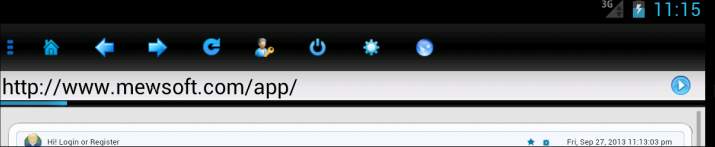
This
is an android application with small size less than 300K that your site
users can download from your site direct or using a QR scanner on their
mobile/tablet and install it on their mobile or tablet and allow them with
one touch to access your site and Login automatically to their account. It
is a complete custom built web browser for our Auction/Webawy only. This is
a standalone application that is sold separately and will be custom built
for every Webawy/Auctionawy customer. You will provide us with your Logo and
your desired application name and we will build a custom version for you.
|
|
Unlimited Nested Categories
|
|
The software has built in category manager in the admin
center which allows to create unlimited number of categories and
subcategories levels. Since the categories are stored also in SQL database
then its is unlimited practically. Each category and subcategory can be
configured separately for generating Meta Tags (title, description,
keywords), using templates, sort order, display under its parent category as
a teaser, html customizations, and more.
|
|
|
|
Multi - Lingual
|
|
The software admin center has a language manager that
allows the administrator to create unlimited number of languages and
translate any language online or on your local PC in just a few minutes. The
software by default comes with the language English, any additional
languages you need just create it from the language manager and translate
the text in minutes. The software use all the languages available in real
time which allows the surfers and users to select which language they want
and the software will keep their preferences using cookies so they need to
select the language only the first time they visit the site. The language
manager will allow the administrator to create new languages, delete
languages, edit languages text or search languages for certain text.
|
|
|
|
Proxy bidding system
|
|
The software has built in proxy (automatic) bidding system.
The software will bid incrementally on the user's behalf up to their maximum
bid, which is kept secret from other others users.
|
|
|
|
Dutch auctions support
|
|
The software support Dutch Auctions (Multiple Item
Auctions). This auction format is perfect for sellers with many identical
items to sell.
|
|
|
|
Fixed Price Support
|
|
The software supports the fixed price items plus the
regular auctions items. Fixed price items will have a buy now buttons only
for speedy purchases or checkouts.
|
|
|
|
Reserve auctions support
|
|
The software support reserve price auctions. A reserve
price is set by a seller who will not sell below a certain price.
Bidders know there's a reserve price, but they do not know what it is. A
bidder must meet or exceed the reserve price and have the highest bid in
order to win or buy the item. If no bidders meet the reserve price, neither
the seller nor the high bidder are under any further obligation. Reserve
prices can not be used for Dutch Auctions.
|
|
|
|
Private auctions support
|
|
Private auctions are used to protect the buyer's privacy.
Bidders' email addresses won't show up on the item or bidding history pages.
When the auction is over, only the seller will know who bought the item.
This option can't be used with Dutch Auctions.
|
|
|
|
Q & A and Seller Comments
|
|
Ask Seller Questions & Answers and Seller Comments. Buyers
can post questions to the sellers and stay pending and hidden questions
until seller deletes or answers these questions, answered questions will be
displayed for everyone. Seller also can add unlimited comments at any time.
Sellers gets email notices about every question posted.
|
|
|
|
Security Code Image
|
|
Security Code Image feature on the user Registeration and
Contact US pages to avoid automated programs and scripts from accessing the
system and hacking.
|
|
|
|
Auto Extend - Anti-Snipper
|
|
Auto Extend feature which allows the auction closing to be
delayed if there is any last minute activity. The Auto Extend feature can
really enhance the last minute auction frenzy that often occurs in auctions
that have had little activity prior to closing, or any highly desirable
auctions. The Auto Extend feature can be enabled/disabled by the seller at
any time and also has an adjustable timeout window by the admin. It is used
to help prevent users from bid sniping an auction by attempting to make a
successful bid at the very last moment. The Auto Extend feature also allows
an online auction to mimic the activity of a live physical auction by
keeping the action going while bids are continuing to be received on the
item.
|
|
|
|
Full user accounts manager
|
|
The software has built in advanced user friendly account
manager system for users. The user account manager has many tools to help
sellers and buyers manage their account very easily. The user account
manager include these tools:
-
Overview
View account information summary.
-
Bidding
View all the auctions currently the user is bidding on.
-
Selling
View all the auctions the user is currently selling.
-
Watching
View the list of the auctions on the user WatchList.
-
Sold
View the list of the auctions the user already sold.
-
Not Sold
View the list of auctions did not sell for this user.
-
Feedback
Feedback forum. View others feedback and leave feedback for other
traders.
-
Money Manager
This allows the users to make payments or add money to their accounts.
-
Payment Activity
This lists all the payments history for the user.
-
Transactions
Full details of all the charges for the user sorted from the most
recent.
-
Add Credit Card
Users can put unlimited number of credit cards on their account for
automatic charging for their balances and fees.
-
Add Bank Account
Users can put unlimited number of bank accounts on their account for
automatic charging for their balances and fees.
-
Edit Profile
Users can edit and update their profile or registration information at
any time.
-
Sign out
This option allows the users to log off their account for security
specially if they use a shared computer.
|
|
|
|
Advanced search tools
|
|
Users has a very advanced search tools besides the simple
and fast search box that shows up on all the pages. With the advanced search
tools, users can refine their search based on the price range, categories,
buy now price range, open or ended auctions, item language, country, region,
location, by item number, by seller, and by bidder, besides the option to
set the display format.
|
|
|
|
Fully automated
|
|
The software has the tools that automate all the auctions
services like processing closed or ended auctions and billing. These only
require using the system scheduled task utilities like Crontab on Unix
systems or task schedule on Windows system.
All users events are automated, sending sellers emails, bidding emails,
outbid, winner, etc emails immediately. Basically, all the users activities
are confirmed by an email.
|
|
|
|
Featured category auctions
|
|
Sellers has the option to features their auctions at the
top of the listings in the same category where their auctions is listed for
an extra fees set by the administrator. Featured category auctions are
displayed by different form at the top on first page of each category.
|
|
|
|
Featured home page auctions
|
|
Sellers has the option to features their auctions at the
home page for an extra fees set by the administrator. Featured home page
auctions are displayed by different form on the home page only. Featured
home page auctions rotate so only specific pre set number of auctions can be
displayed on the home page but the system can have unlimited number of
featured home page auctions.
|
|
|
|
Gallery auctions
|
|
This is one of the most powerful features that users like
in auctions sites. The sellers can choose to display their auctions in the
gallery section. Seller can choose a specific image to be displayed in the
gallery where users can browse the auctions by the images not by the text.
|
|
|
|
Images and multimedia files uploads
|
|
Very important now in any auction site, old auctions sites
users used to host their images at some other sites that charge for hosting
their images for some time. With this option available in your system, you
host your own image hosting integrated in your auction system. Administrator
sets the fees according to the number of files that will be uploaded in each
auction and users will be able to preview the images and also select how
their images will be displayed for example as a slide show or above each
other.
|
|
|
|
Powerful users feedback forum
|
|
Feedback forum for rating trading partners. It is a very
good way to keep the auction system honest by letting seller and buyers
involved in transactions to rate and leave feedback and comments about each
other and how they treat each other. Every user has a Feedback Profile made
up of comments from other users. The feedback forum has the following
functions:
-
See the feedback profile of a registered user
-
View feedback a member left about others
-
Leave feedback on all Auctions I won
-
Leave feedback on all Auctions I sold
-
View my feedback profile
|
|
|
|
Announcements system
|
|
The administrator can post any announcements to the auction
users at any time from the admin center and it will be displayed for user.
|
|
|
|
Fully integrated banner server
|
|
The search engine is integrated with full banner manager
software SQL database driven same as the engine itself to handle millions of
impressions per day for heavy traffic sites. The banner server allow to
create and manage unlimited accounts, campaigns and banner zones or groups
or locations on your templates. The banner also can be used directly on your
other sites and your static or dynamic pages either with direct call or with
SSI. All banner call are done from the same main banner program for all
zones so you do not need to copy scripts or configure anything. The banner
also has a cash buster to avoid browsers to cash banners images. The banner
server also has a full client report area so all your banner advertisers
will have a login to the stats area to check their campaigns stats in
different format either daily or hourly report for every individual
campaign.
|
|
|
|
User registration confirmation
|
|
All users are confirmed by sending a confirmation code and
a specific website address to the email address the user used to register.
The new users accounts will not be activated until they check their email
and click the unique confirmation address with the unique confirmation code.
This assures that no user will be able to register to the system with
invalid email address or false information.
|
|
|
|
Database Management
|
|
The software admin center has many tools to manage and
control everything in the system database. This includes tools also for
managing the SQL server itself. Among these database and SQL server tools
are:
-
Backup or export the whole SQL database into deleimited
ascii text file.
-
Loading or importing the SQL database from ascii
deleimited text files.
-
Unloading and Loading SQL tables separately.
-
Viewing SQL server variables and current status.
-
Empty, delete, optimize, check SQL tables separately.
-
SQL Commander to run any SQL statements.
-
and more...
|
|
|
|
New, Hot, Sold, Going, Gone, Big ticket Auctions etc
|
|
Nice features allows the browser or surfer to browse only
newly submitted auctions in all categories or specific category, hot
auctions or the auctions that received a lot of bids, and going or ending
soon auctions.
|
|
|
|
|
|
HTML Template based
|
|
One of the most powerful features of this software is its
use for pure html templates for every single byte generated by the software.
This means there is no limit on the customizations the same as you edit
normal html pages. Not only templates for the pages generated by the
software but also for every form, hyperlinks, any generated output,
listings, navigations, and everything the program prints to the output is
customizable.
|
|
|
|
Visual html editor
|
|
The administrator center has built in Visual html editor
for online editing the templates. Also templates can be edited with any
visual html editor like Frontpage or else.
|
|
|
|
Custom functions
|
|
The software has built in script editor in the admin
center which allow you to write your own Perl, HTML, and JS functions and
insert the output to the templates with the rest of the program output.
Custom functions can use the current program templates as well as you can
define new templates to be used. This means you can build new functions with
its own templates.
|
|
|
|
External programs integration
|
|
Not only you can build your own custom Perl functions but
also you can directly integrate your current scripts and programs with the
software and insert the programs output in the templates directly. There are
many built in classes to run SSI functions from inside the templates.
|
|
|
|
Unlimited mailing lists
|
|
SQL based mailing lists unlimited in its capacity for
each list. The admin center "Mail manager" has full utilities to manage
unlimited number of mailing lists and mass email:
|
|
|
|
Easy setup wizard
|
|
The software is very easy to install and configure even
for just beginners. No need to be programmer or professional to run or
manage the software on your server, all you need is the general internet
stuff, like how to use any ftp program to transfer files, how to change
files permissions, very little html to customize the templates or links to
your look and feel. Just transfer the files to your server, change
permissions and you are done with the installation. The software has built
in setup and configuration wizard that will check and create directories,
permissions, SQL tables and more.
|
|
|
|
Very customizable
|
|
The first thing you must search in any software is how
far is it customizable. Whatever its function if it is not 100% customizable
then it looses at least 80% of its value. Mewsoft search engine software
like all Mewsoft products is very customizable. There is not single byte
that is not customizable. Lets explain this shortly
The software uses html templates for the body of the
pages that generated. Inside these html templates are the output of the cgi
programs and the text itself.
Now the software is multi-lingual, which means the same
text should be in different languages and this is done by inserting language
variables inside the templates between "[[" and "]]", for example a field
form that has text label "Please enter your first name" this has assigned a
variable name for example first_name, to insert this label in the
template just insert it like this [[first_name]]. When the surfer
selects specific language this variable will be translated from the language
selected. This shows that you can move this language variable anywhere
inside your template. The value of the language variables itself you change
it from the language file, so you edit it to anything you want.
Second, the cgi programs output is inserted inside these
html templates in two methods. The first method is by using Plugins between
comments like this
, this will draw an input text box for the surfer to
enter the website title. of course you move this Plugin anywhere inside your
templates. The second method is using what we called it Classes in the form
, this will draw a search box and its width
is 40 characters, the search box form itself is customized and has its own
template, you can change the box with by changing the number 40 to anything.
So basically everything the program prints out is customizable and you have
full control over the look and feel. You can use any WYSWYG html editor like
Frontpage 2000 or else to edit the templates. The admin center has built in
html template editor online and Visual html editor integrated.
|
|
|
|
Real time Credit card and payment processing
|
|
Full integration for real time processing credit cards
and other payment methods online and depositing the money directly to your
merchant account and crediting the users accounts with interface to major
online credit card providers and real time payment processors, currently the
software directly support these providers:
Authorize Net, Quick Commerce, Planet Payment, RTWare,
Skrill (MoneyBookers.com),
Stipe
www.stripe.com,
Suomen Verkkomaksut
Finland, Merchant Commerce, iBill, Plug 'n Pay, Beanstream, LinkPoint, Bank
of America, Cardstream, iTransact, VeriSign Payflow Pro, eProcessingNetwork,
eWay, Cambist, GoRealTime, Paypal DoDirectPayment (Website Payment Pro),
Paypal IPN, InternetSecure
www.internetsecure.com , CyberSource
www.cybersource.com,
OpenECHO www.echo-inc.com,
TransactionCentral
www.PriMerchants.com, Capstone
www.CapstonePay.com,
Protx www.Protx.com,
Exact www.e-xact.com,
TCLink
www.TrustCommerce.com, eSelectPlus
www.Moneris.com,
SecureHostingUPG
www.SecureHosting.com, StGeorge
www.StGeorge.com.au,
StormPay www.StormPay.com,
Skipjack www.Skipjack.com,
TransFirst
www.TransFirst.com, Litle & Co
www.litle.com,
Alertpay.com (Paypal
better Alternative) IPN fully automated,
www.elavon.com,
www.ppipaymover.com,
www.ippay.com,
www.vancoservices.com,
www.iridiumcorp.co.uk,
www.viaklix.com, Litle
www.litle.com, NMI
www.nmi.com, USAePay
www.usaepay.com, Cardcom
www.cardcom.co.il,
PaymenTech
www.chasepaymentech.com, Ogone
www.ogone.com,
CCAvenue www.ccavenue.com cashu.com payfast.co.za
Also if you do not have a merchant account you still can use all other
methods for accepting payments like mail payments by Paypal, Check,
Money order, or using third parties like Western Union or else,
Once you receive the payments in any way you make the deposit manually to
the user account from the admin center accounts manager and it will show
directly in the user account manager in his balance.
|
|
|
|
Portal Stock, Currency
|
|
The software has many portal tools including currency
converter, stock quote, and more.
|
|
|
|
Paypal full automatic integration
|
|
The software is fully integrated with built in functions
for accepting online payment by credit cards and electronic checks (e-check)
through the online payment processor Paypal different methods. For more
information or to get your free account with Paypal and start immediately
accepting payment online in real time, please check Paypal website at
www.paypal.com.
The software support using Paypal IPN (Instant
payment notification) to automatically process the payment with paypal
system without depending on the emails, and the second method is using
Paypal Website Payment Pro which uses paypal DoDirectPayment API
integration
|
|
|
|
Auctions Manager
|
|
The software admin center has the tool "Auctions Manager"
which allows the administrator to manage all the auctions in the system
database.
-
Browse and manage the auctions
browse the auctions categories normal or search for specific auctions
by any criteria and manage the auctions in different ways. The admin can
relist auctions, close auctions, delete auctions, cancel bids on auctions
and can do many other functions on the currently open auctions or closed
and ended auctions.
-
Process closed auctions
This tool can be used at any time to manually process the ended auctions.
-
Automate Processing
This tool can be used to automate processing auctions at preset times, for
example every one hour by using the server tools like Crontab on Unix or
scheduled tasks on Windows systems.
-
View Log
This tool will show the auctions processing history either manually or
automatically.
-
and more.
|
|
|
|
Accounts Manager
|
|
Fully manage all users accounts. Admin can browse users by
category based on the first user name letter, or search for specific users
by any criteria. Admin can do many functions on users accounts including
activating, deactivating, deleting, adding credits, adding debits, and login
to the user account manager and use all the user tools.
|
|
|
|
Full Accounting System
|
|
The software admin center has full accounting and billing
system. The accounting system keeps track of all users billing and invoicing
records, send periodical invoices, resend invoices at any time, send overdue
invoices, send deactivation overdue invoice, reports for all invoices and
billing records.
|
|
|
|
Fees Manager
|
|
The software built with the idea in mind for making a real
revenue for the owner in many different ways. Based on this, the software
has many options for the admin to set a listing fees for each service the
seller may use.
-
Regular Insertion Fees Setup
Different ranges for the Regular Auctions listing fees.
-
Buy Now Fees Setup
Different ranges for the Buy Now Featured Auctions fees.
-
Reserve Auctions Fees Setup
Different ranges for the Auctions that has a Reserve price fees.
-
Final Value Fees Setup
Different ranges for the Final value fees based on the final items
sale price.
-
Additional Options Insertion Fees Setup
-
Featured Home Page Auction fees
-
Featured Category Auction fees
-
Gallery Listing fees
-
Bold Title fees
-
Title Color fees
-
Gift Icon fees
-
Upload One File fees
-
Upload Two Files fees
-
Upload Three Files fees
-
Upload Four Files fees
-
Upload Five and Up Files (Fees per file) fees
|
|
|
|
Files uploads options
|
|
The admin can allow sellers to upload files when submitting
auctions to the system and charge fees for this service. This option can be
turned off or on at any time. There are options to set what files types
allowed for the system security. Also options to set the maximum number of
files that can be uploaded per one auctions submitted, the maximum size of
each individual files, and the maximum size of all the files that can be
uploaded per single auction submitted. The uploaded files automatically
deleted when the auctions deleted.
|
|
|
|
Hundreds of options
|
|
The software administration center has hundreds of
configuration options that control the software behavior and the look which
can not be listed here, for detailed information about these options please
see the product manual.
|
|
|